Greggs Allergen & Dietary Filter Tool

Ordering at Greggs with a food allergy, intolerance, or dietary requirement has always been a bit of a challenge. The chain’s bakeries are busy, shared-preparation environments, and while official allergen information exists, cross-referencing it quickly when you’re mid-queue isn’t exactly straightforward. That’s what this tool is built to fix.
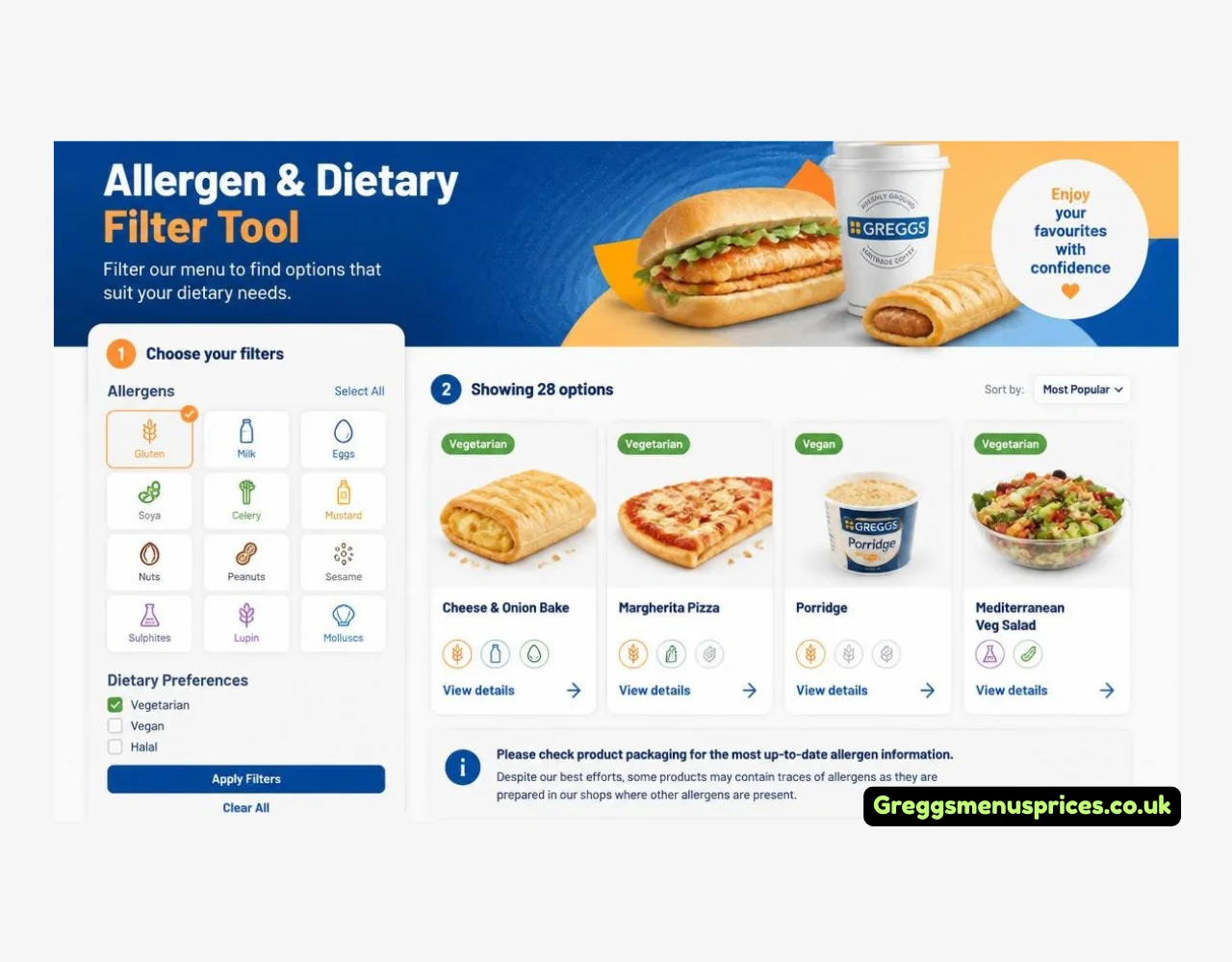
The Greggs Allergen & Dietary Filter Tool lets you build your exact dietary profile in two steps. First, choose your dietary preference — no preference, vegan, vegetarian, or gluten-free. Then tick any allergens you need to avoid from the full list of 14 major allergens covered under UK food law: gluten, milk, eggs, peanuts, tree nuts, fish, crustaceans, molluscs, soybeans, celery, mustard, sesame seeds, sulphites, and lupin. Hit the filter button, and the tool instantly narrows the entire Greggs menu to items that contain none of your flagged ingredients — sorted neatly across Breakfast, Savouries, Sandwiches, Sweet Treats, Drinks, and Hot Food.
Items that pass your filter show a “Safe ✓” badge. You can download or print your filtered list to keep as a reference, or share your results directly from the page.
One important caveat: the Safe badge confirms an item contains no direct allergen ingredients based on its recipe. However, Greggs bakeries use shared ovens and open preparation areas, meaning cross-contamination can never be entirely ruled out. If you have a severe or life-threatening allergy, always speak to store staff directly and check Greggs’ official allergen documentation before ordering.
All allergen data in this tool is sourced from the official Greggs Allergen Guide, verified for 2026.
Greggs Allergen & Dietary Filter
Find menu items safe for your exact dietary specifications
Q1: Which allergens and dietary preferences can I filter by?
The tool covers all 14 major allergens required under UK and EU food labelling legislation: gluten and cereals containing gluten, milk and dairy, eggs, fish, crustaceans, molluscs, peanuts, tree nuts, soybeans, celery and celeriac, mustard, sesame seeds, sulphites and sulphur dioxide, and lupin. You can tick any combination of these to exclude them simultaneously. Separately, Step 1 lets you apply an overarching dietary preference of vegan, vegetarian, or gluten-free before you filter by individual allergens. Both filters operate together, so a vegan who also needs to avoid sesame seeds can apply both at once and see only items that satisfy both criteria.
Q2: Does a Safe tick guarantee the item is completely safe for someone with a serious allergy?
No, and this distinction is critical. The Safe badge confirms that a particular allergen does not appear as a direct ingredient in that product according to the official Greggs Allergen Guide for 2026. It does not and cannot guarantee that the item is free from traces of that allergen. Greggs stores are high-volume, shared baking environments with open preparation surfaces, shared ovens, and shared handling equipment. Cross-contamination risk is always present and cannot be eliminated by the retailer. Anyone managing a severe or life-threatening allergy — particularly to peanuts, tree nuts, or sesame — must speak directly with store staff and consult the official Greggs allergen documentation before consuming any product.
Q3: How current is the allergen data used in the tool?
The allergen data is based on the official Greggs Allergen Guide for 2026, cross-referenced with publicly available product information. Greggs regularly updates its recipes, seasonal menu items, and supplier ingredients, which can change allergen profiles without prior public notice. Always verify directly with Greggs plc using their official resources before relying on this tool for any high-severity dietary decision. This tool is provided as an advisory framework and not as a substitute for official allergen labelling or direct communication with the retailer.
Q4: Can I download or print my personalised filtered results?
Yes. Once you have applied your filters and the safe items list has populated, a Download and Print Safe List button becomes available. This generates a clean, printable version of your personalised safe menu filtered to your exact dietary and allergen criteria, broken down by category — Breakfast, Savouries, Sandwiches, Sweet Treats, Drinks, and Hot Food. There is also a copy and share option, which is particularly useful if you are checking options on behalf of someone else ahead of a visit or sending a summary to a friend with specific dietary needs.
Q5: Does the tool work for multiple allergens and a dietary preference at the same time?
Yes, this is one of the tool’s core features. You can apply a dietary preference in Step 1 — for example, vegetarian — and then select multiple allergens to exclude in Step 2, such as eggs, mustard, and sulphites simultaneously. The filter will then display only the items from the Greggs menu that satisfy every single condition you have applied at once. This makes the tool significantly more practical than single-allergen lookups, particularly for people managing multiple dietary requirements within a household or workplace group order.

Hey there! I’m Harper Jones, and I spend my time scouting to find you the absolute best places to eat from and help you hunt down the top food deals so you can enjoy amazing meals without the hefty price tag. Also, I attempt to provide you with supplementary information regarding the food industry.